AGAIN.
It remembers why the band stopped.
Record the rehearsal. Every time the band stops to talk, AGAIN. keeps what was said, turns it into notes for the right player and song, and lets you replay the music right before the stop. Version 2 does the same for writing sessions and table reads, sorted by voice.
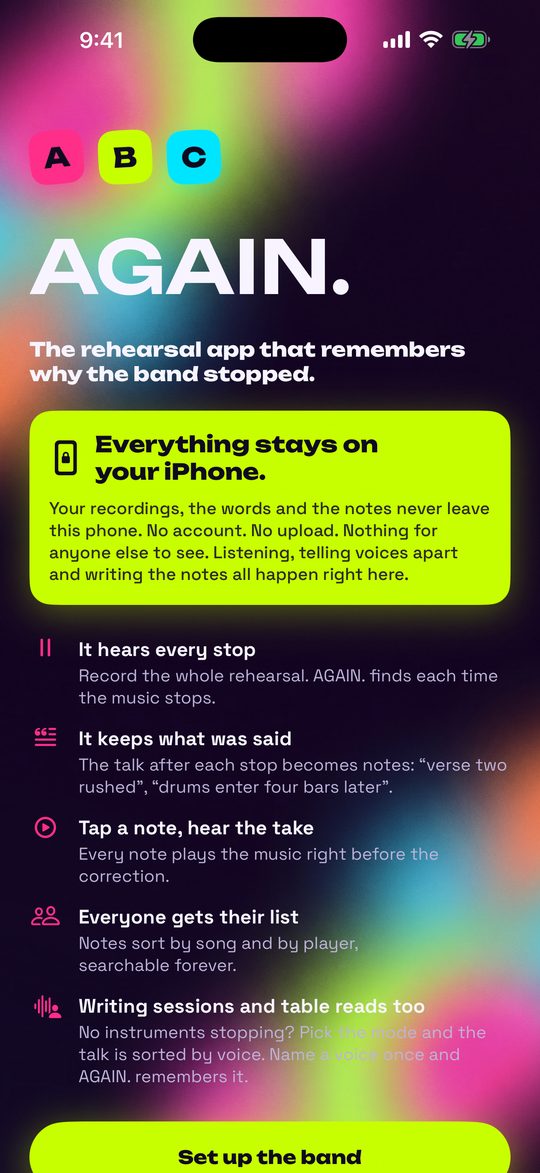
Your recordings, the words and the notes never leave your iPhone — or, with the web app, the browser on that device. No account. No upload. Nothing for anyone else to see. Listening, telling voices apart and writing the notes all happen right there.
Set up your band
The first time you open AGAIN., the first screen shows what it does and says it plainly, in the lime panel: everything stays on your device. Tap Set up the band.
- Type the band or ensemble name.
- Add your players: a name and an instrument for each (Vocals, Keys, Bass, Drums, Guitar, or your own). For a cast or a writing room, add the people.
- Type your setlist, one song per line.
- Tap Start.
Just looking around? Tap Try it with a sample band to fill in a practice band and songs.
You can change all of this later: tap the setlist button at the top right of the home screen to open the band sheet.
Record, and pick the mode
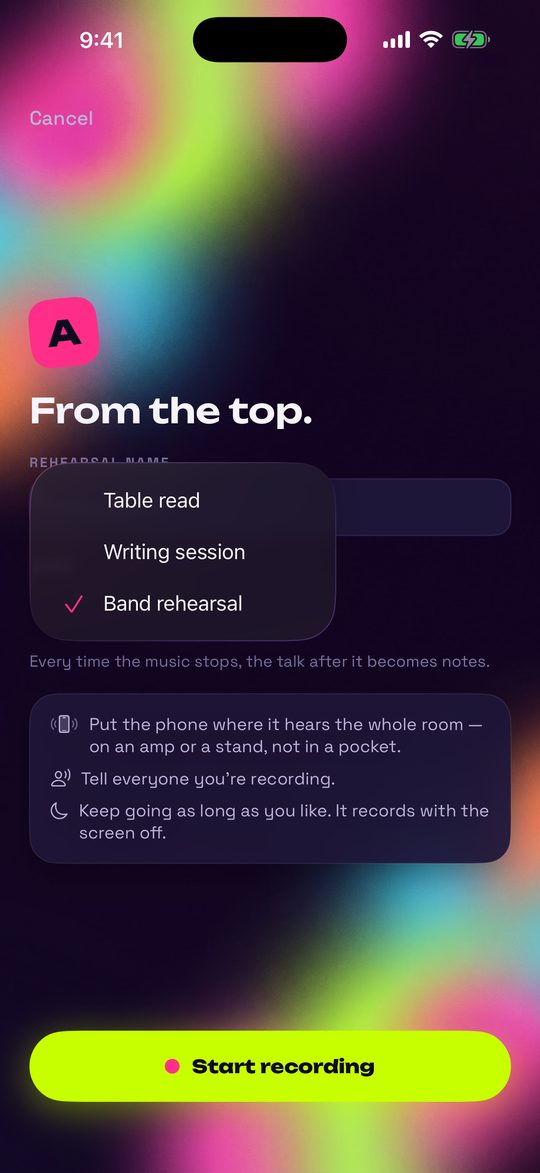
- Put the phone where it hears the room. For a band: on an amp, a stand or a music stand. For a writing session or a table read: in the middle of the table. Not in a pocket.
- Tell everyone you're recording.
- Tap Record and name it if you like (for example "Thursday run-through").
- Open Mode and pick Band rehearsal, Writing session or Table read. AGAIN. remembers each band's last choice.
- Tap Start recording. Play and talk the way you always do.
- When you're done, press and hold Hold to end rehearsal until the bar fills.
While you record
- Now playing: tap the song when you start it, so every stop lands on the right tune. (A table read has no songs, so it doesn't show.)
- Mark a stop now: add a stop by hand. In a writing session or a table read, tap it whenever a note is given.
- The screen shows Playing, Talking or Quiet, so you can see what it hears.
- On iPhone it keeps recording with the screen off, as long as the session runs.
Already have a recording?
Tap Import a recording, under your rehearsals, and pick an audio file (m4a, mp3, wav or aiff). AGAIN. asks which mode it is, then reads it like a live recording.
After the session, AGAIN. reads it: it transcribes what was said and writes the notes. A long session takes a few minutes. If you close the app partway, open it again and it picks up where it left off.
Stops and notes
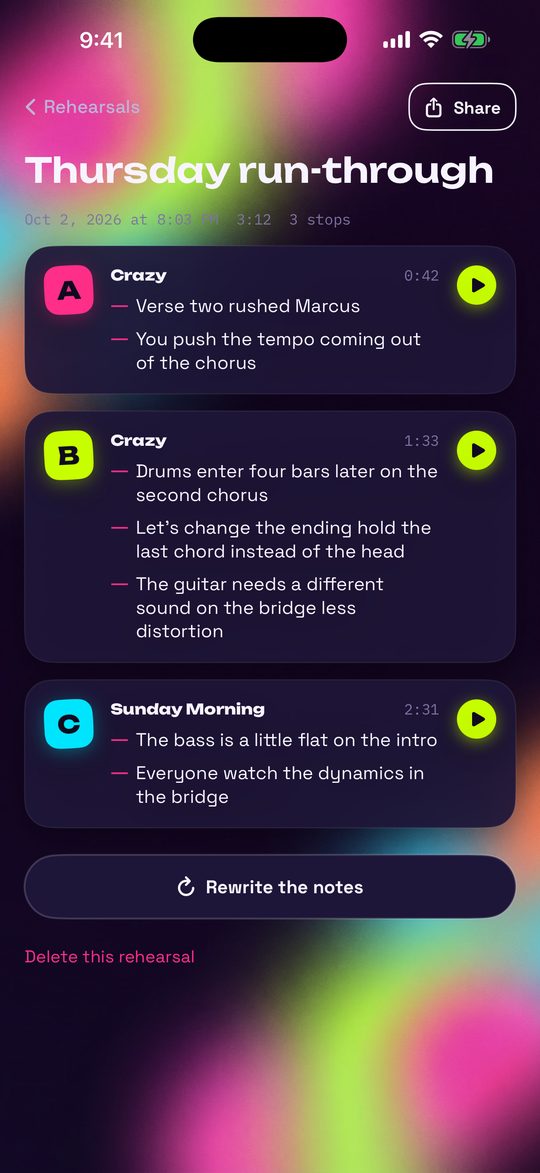
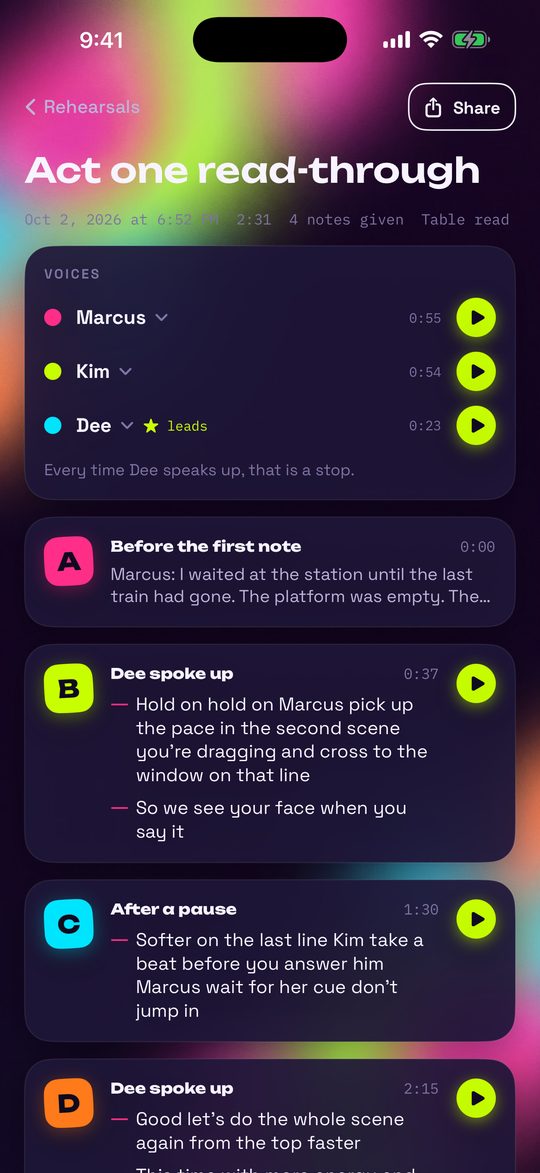
Open a rehearsal to see its stops. Each one gets a rehearsal letter, A, B, C…, like the boxed letters in a score. Each stop shows when it happened and how long the take ran before it.
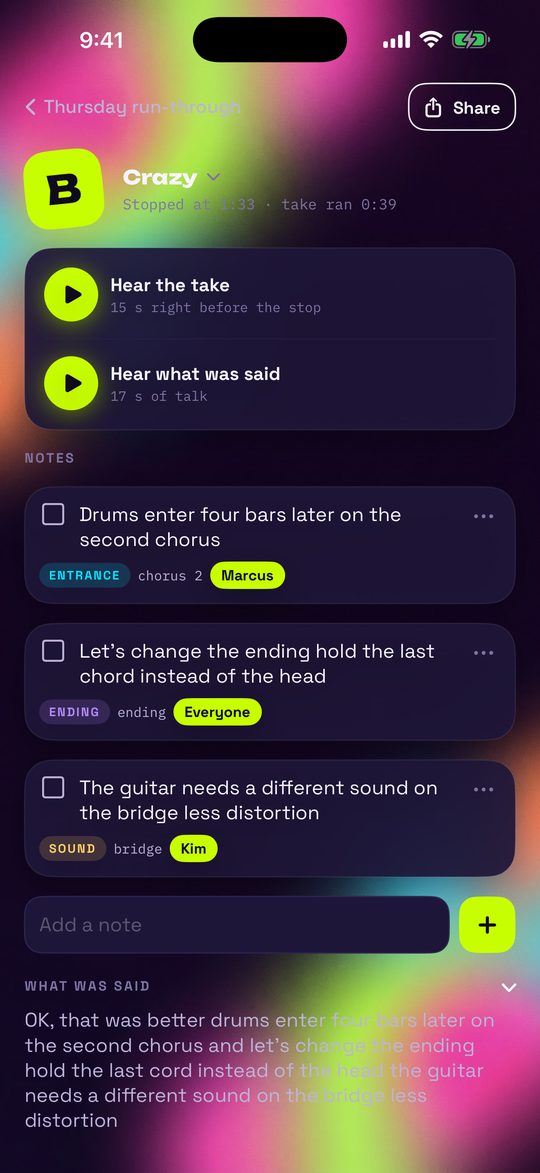
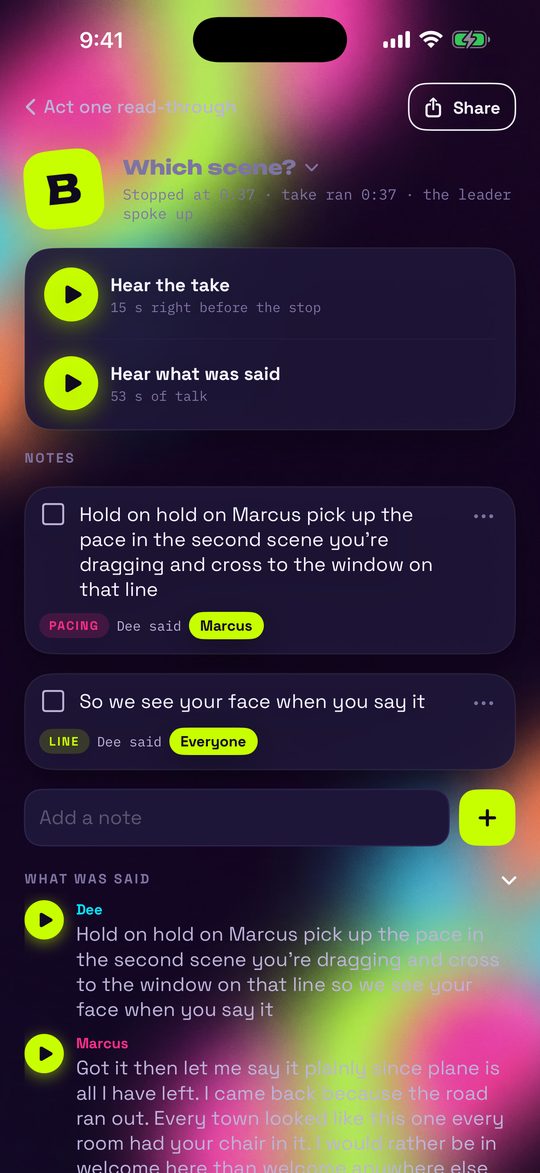
▶ Hear the take
Plays the 15 seconds of music right before the band stopped. No scrubbing. Every note has the same ▶.
Hear what was said
Plays the talk itself, with the full transcript under What was said.
Talk before the first song is kept too, as a stop marked Before the first take.
The notes
Each note is short and says who it's for, which song, and what kind of fix it is:
- tempo
- entrance
- ending
- arrangement
- dynamics
- sound
- pitch
- lyrics
- Edit a note: tap it and type.
- Change who or which song: tap the note's kind or the names under it. A note can go to one player, several, or Everyone.
- Add your own: type in the Add a note field.
- Wrong song for the stop? Tap the song name on the stop's page and pick the right one.
- Rewrite the notes on the rehearsal page builds the notes again from the transcripts. Notes you wrote yourself stay.
- Delete a note from its ⋯, or a whole rehearsal from its page. AGAIN. asks before deleting a rehearsal and its recording.
Writing sessions and table reads New
No instruments stopping? Pick Writing session or Table read. AGAIN. tells the voices in the room apart, right on the device, and turns the session into stops and notes the way it does for a band.
Where the stops come from
- Your taps on Mark a stop now.
- Music that stops: in a writing session, when someone plays a part and the room starts talking, that's a stop, exactly as in a band rehearsal.
- A long pause: about four seconds of nobody talking.
- The leader speaking up (below).
- On a long stretch of talk, a stop every couple of minutes, so all of it gets read.
Each stop says what made it one: Dee spoke up, After a pause, Marked by hand, The music stopped, Moment 3.
Name the voices
On the rehearsal page, Voices lists every voice and how long it spoke. ▶ plays a few seconds of it. Tap the name and pick one of your players, or Someone else… and type it.
- AGAIN. remembers each named voice for that band, so the next session names it by itself.
- Named someone wrong? Tap the voice and pick the right name. The wrong one is forgotten.
- One person showing up as two voices? Give both the same name.
Who leads the room
On the director or the lead writer, tap Leads the room. If that voice has no name yet, AGAIN. asks Who leads the room? right away. From then on, every time they speak up after the others have had the floor, that's a stop. The band remembers who leads, too.
The notes
Table read
Notes come from the leader's words, not the reading. The page counts notes given, and a stop asks Which scene?
- line
- delivery
- pacing
- blocking
- cue
- character
Writing session
Everyone's words count.
- lyric
- melody
- chords
- structure
- groove
- hook
Every note says who said it (Dee said). On a stop, What was said shows the talk line by line, each line in its voice's colour, with its own ▶.
Songs, Players, Search, Share
Songs
Every note for each tune, across all your rehearsals. Turn on Show finished notes to see the ones already checked off.
Players
Each musician's own list. Tap Send to text or email it to them.
Search
Finds words in your notes, and under Also said out loud, in the full transcripts.
Share
The square next to Record sends your latest rehearsal's notes: a text, an email, the group chat. Every rehearsal and every stop has its own Share.
These lists show the band that's open. Switch bands to see another band's notes.
More than one band, more than one setlist
Play in a band, a choir and a trio? Each band keeps its own players, setlists, rehearsals, notes and named voices.
Bands
- Tap the band's name under AGAIN. on the home screen to open Bands.
- Tap a band to switch to it, or add a new one by name. A new band opens on its band sheet so you can add players and songs.
- Swipe a band (or tap Edit) to delete it. Your last band always stays.
Setlists
- Open the band sheet (setlist button, top right) and find Setlists. Give a band as many as it needs: Sunday service, the wedding, the club set.
- The one with the round mark is the one in use. Rename a setlist right where it is.
- Under it, Songs in <setlist> holds that setlist's songs.
- With two or more setlists, AGAIN. asks which SETLIST before you record. Its songs are the ones you tap while you play.
The web app
AGAIN. also runs in the browser on Android phones and tablets, desktops and laptops, with everything in this guide, Version 2 included. It is $2.99 once. Get it at:
againapp.app
After you pay, AGAIN. opens at againapp.app/app, unlocked, and you get a serial that opens it on up to 3 of your devices.
Put it on your Android Home Screen
- Open againapp.app/app in Chrome.
- Tap ⋮ at the top right.
- Tap Add to Home screen (it may say Install app), then Install.
- Open AGAIN. from your Home Screen. It opens full screen and works with no signal in the rehearsal room.
Samsung Internet: tap ☰ at the bottom right, then Add to (or Add page to), then Home screen. Firefox: tap ⋮, then Add to Home screen.
- The first time, the web app downloads its listening engines (about 120 MB, the voice models included), once. Do that on Wi-Fi before rehearsal. After that it works with no signal.
- On a computer, AGAIN. fills the window with side-by-side panes.
- Lost your serial? On the unlock screen choose I already bought it and type the email you paid with. Once AGAIN. is open, your serial is at the bottom of the band sheet.
- Notes stay on the device you made them on. The web app doesn't sync between devices, and the web app and the iPhone app are separate purchases.
Fixing things
- It missed a stop.
- Next time, tap Mark a stop now while recording. Very short pauses, like a count-off or a quick "again from the bridge," are kept inside the take on purpose.
- It found a stop that wasn't one.
- Applause and cheering at the end of a song are counted as music, not talk. Notes on a stop you don't need can be deleted from their ⋯.
- The notes are wrong.
- Tap a note to fix it, change its kind or who it's for, or tap Rewrite the notes. Your own notes stay.
- A voice has the wrong name.
- Tap the voice and pick the right name. AGAIN. forgets the wrong one for that band.
- One person shows up as two voices.
- Give both the same name. Two people who sound alike can end up as one voice: say so to us, it helps.
- The stops of a table read land in the wrong places.
- Mark who leads the room, and tap Mark a stop now while you record. The stops follow the leader once you've picked one.
- "No words caught."
- The phone didn't hear the talk clearly. Move it closer to the middle of the room and away from the loudest amp.
- The iPhone says speech data will be sent to Apple.
- That is Apple's own message, the same for every app that listens. AGAIN. only uses the speech recognizer that runs on the iPhone, and says so right under Apple's words. Nothing is sent.
- It stopped partway through reading.
- Open AGAIN. again. It carries on where it left off.
- It won't record.
- AGAIN. needs the microphone. On iPhone, turn it on in Settings › AGAIN. In a browser, allow the microphone when asked.
- Other languages?
- AGAIN. is in English for now. Stops, voices and ▶ work in any language, but transcripts and notes need English.
Privacy and help
No account. No ads. No upload. Recordings, transcripts, voices and notes stay on your device. Telling voices apart runs on the device too. On iPhones with Apple Intelligence turned on, notes are written by the on-device model; everywhere else a built-in rules engine writes them. All of it works offline.
The voice models and engines AGAIN. listens with are credited in the band sheet under Credits and licences.
To start over, open the band sheet and tap Erase everything. It removes every rehearsal, note, named voice and recording, and asks first.
Need help?
Email us and say which phone or computer, and which browser, you're on:
trevbeatsmultimedia@gmail.com